
What Features Does a Plastic Surgery Website Actually Need to Rank?

Discover which plastic surgery website design features actually improve rankings — here's what your site needs to attract more consultation bookings.

Parts of this article used AI but the thinking is all human.

Find Out What Your Digital Marketing Budget Should Be

This post may contain affiliate links.

Imagine a solo plastic surgeon invests in a beautiful website. Clean design. Polished before-and-after photos. A sleek homepage that would impress any patient who lands on it.

Months pass. Consultations don’t increase. Google Analytics shows almost no organic traffic.

The website looks great. Google has no idea it exists.

This isn’t a rare story. It’s the norm for practices that prioritize aesthetics over architecture. Plastic surgery website design that earns rankings requires more than a good-looking template. It requires deliberate, technical choices that signal relevance and authority to search engines.

Here’s what actually matters.

What Features Does a Plastic Surgery Website Actually Need to Rank?

Plastic Surgery Website Design Key Takeaways

  • A plastic surgery website that looks great but lacks technical structure will struggle to rank on Google.
  • Individual service pages for each procedure give search engines more ranking opportunities than a single combined services page.
  • Solo practices with one location still need a dedicated location page with NAP data, a Google Map, and city-specific keyword content.
  • Page load speed is a confirmed Google ranking factor — sites that load in five seconds see a bounce rate of 38%, compared to 7% for sites loading in one to three seconds.
  • Schema markup helps control how your practice appears in search results and can improve click-through rates.
  • Internal linking connects your service pages, location page, and blog in a way that distributes site authority and makes it easier for Google to index your content.
  • These features function as a system. Each one supports the others. Missing one weakens the whole.
  • WordPress offers the most SEO flexibility for solo practices; Squarespace is a solid mid-range option; Wix has improved but still has limitations for long-term organic growth.

Your Website Is a Marketing Asset — Or It Isn’t

Most plastic surgery websites are built like brochures. They look professional. They describe services. They include a contact form.

And they do almost nothing for organic search visibility.

A high-performing plastic surgery website does two things at once: it earns patient trust and it earns Google’s trust.

Those goals are not in conflict. But they do require intentional planning from the start.

The features below are not optional upgrades.

They are the foundation of a plastic surgery web design strategy built for long-term visibility.

Optimized Service Pages That Google Can Actually Rank

One of the most common mistakes in plastic surgery web design is grouping every procedure onto a single “Services” page.

It feels organized. It’s not.

Google needs individual pages to understand what you offer and where to rank you.

  • A single services page gives Google one target to work with.
  • Individual service pages give Google dozens of ranking opportunities.

One Page Per Procedure

Each procedure you offer — rhinoplasty, breast augmentation, tummy tuck, facelift — deserves its own URL, its own title tag, and its own content.

A standalone rhinoplasty page can rank for “rhinoplasty surgeon in [city].”

A combined services page cannot.

This is one of the clearest wins available in plastic surgery website design. And it is available on WordPress, Squarespace, and Wix.

What an Optimized Service Page Needs

Each service page should include:

  • The procedure name and your city in the title tag and first paragraph.
  • It should answer the questions patients actually search — recovery time, results, candidacy, cost ranges.

Add a patient FAQ section, before-and-after examples, and a visible consultation call-to-action.

These elements keep patients on the page longer. That sends positive engagement signals to Google, which can support your rankings over time.

For more on how design and content work together, read our guide on plastic surgeon website design.

Location Pages — Even Solo Practices Need Them

Many solo surgeons assume a homepage is enough to capture local search traffic. It is not. Google ranks location-specific content.

Without it, your plastic surgery website struggles to appear in searches like “breast augmentation Chicago” or “rhinoplasty surgeon near me.”

A location page bridges that gap. It tells Google exactly where you practice and which patients you serve.

What a Strong Location Page Includes

Your location page should feature city and procedure keyword combinations relevant to your market.

Include:

  • An embedded Google Map
  • Your NAP (name, address, phone number)
  • Local references like neighborhoods served or nearby landmarks.
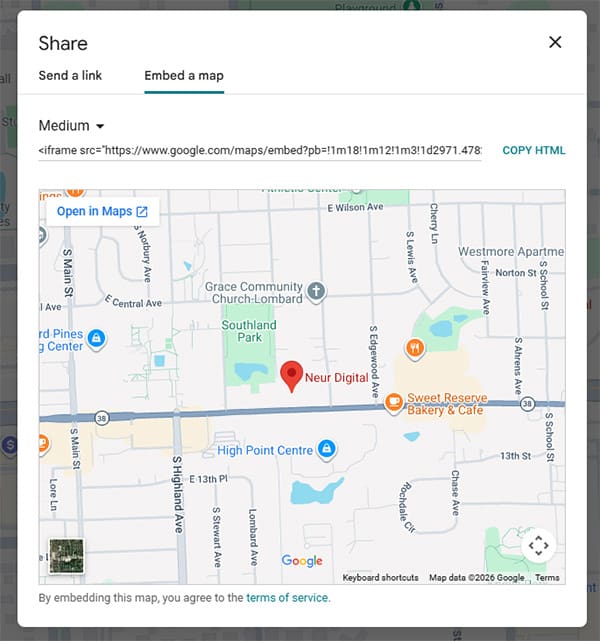
An embedded Google Map on your plastic surgery website location page helps patients find your practice and reinforces your NAP data for local SEO.

An embedded Google Map on your plastic surgery website location page helps patients find your practice and reinforces your NAP data for local SEO.

To embed a map on your plastic surgery website design, go to:

  • Google Maps
  • Search your practice address
  • Click Share
  • Click Embed a map
  • Copy the iframe code
  • Paste it in your website

NAP consistency matters here.

Whatever appears on your location page must exactly match your Google Business Profile. Discrepancies confuse search engines and can quietly suppress your local rankings — without a single visible warning.

Fast Load Times Are a Ranking Factor

Google has confirmed page speed as a direct ranking signal. It is not a nice-to-have. It is part of how your plastic surgery website competes in search results.

The data backs this up.

According to Pingdom, a site that loads in five seconds sees a bounce rate of 38%.

A site that loads in one to three seconds sees a bounce rate of just 7%.

Every second you lose costs you visitors and visibility.

What Slows Plastic Surgery Websites Down

The usual culprits are:

  • Uncompressed images
  • Autoplay videos
  • Too many background plugins

Each one adds load time your patients and Google are measuring.

Audit your media files regularly.

Compress images before uploading. Limit video autoplay on mobile. These are controllable factors that directly affect your Core Web Vitals scores.

Platform Snapshot for Practices

WordPress offers the most flexibility and the most control over speed optimization. Plugins like WP Rocket and Smush handle caching and image compression effectively.

The tradeoff is that WordPress requires regular maintenance to stay fast and secure.

Hackers find it easier to get into websites that haven’t been updated. 

Squarespace performs at a mid-range level out of the box.

It is a reasonable choice for a solo practice that wants a professional look without heavy technical management. SEO customization options are more limited, though.

Wix has improved significantly in recent years but still lags behind WordPress in speed control and SEO depth. If long-term organic growth is a priority, that gap matters.

Schema Markup — The Feature Most Surgeons Skip

Schema markup is structured data added to your website’s code. Patients never see it. Google reads it constantly.

It tells search engines precisely what your page is about:

  • Your specialty
  • Your location
  • Your credentials
  • Your reviews

Done correctly, schema markup improves how your practice appears in search results.

That means rich snippets, star ratings, and FAQ answers pulled directly into your listing.

Schema Types That Matter for Plastic Surgery Websites

Local Business schema communicates your name, address, phone number, hours, and geographic coordinates.

Physician schema identifies your specialty and board certifications.

FAQ schema surfaces patient questions directly in search results. Review schema displays your star rating in the listing itself.

Most patients form an opinion before they click a link. A result with visible star ratings and FAQ previews earns more clicks than a plain listing — even when rankings are equal. That click-through advantage compounds over time.

On WordPress, plugins like RankMath make schema setup manageable.

On Squarespace and Wix, native schema support is limited, and custom code or third-party tools are often needed.

Internal Linking — Connecting Your Pages for Google and Patients

Internal links do two things. They help Google understand how your pages relate to each other. And they guide patients through your plastic surgery website toward a consultation.

For a solo practice, this is one of the most underused tools in plastic surgery web design.

A Simple Internal Linking Strategy

Every service page should link to two or three related procedure pages.

  • Your blog posts should link back to the most relevant service pages.
  • Your homepage should feature links to your highest-priority procedures.
  • Your location page should link out to all service pages.

Every internal link should use descriptive anchor text.

Not “click here,” but “learn more about rhinoplasty in Chicago.”

This approach distributes authority across your entire plastic surgery website and makes it easier for Google to crawl and index everything you offer.

For a deeper look at how content supports your plastic surgery web design strategy, explore our breakdown of plastic surgery content marketing.

These Features Work Together — Not in Isolation

Optimized service pages, a strong location page, fast load times, schema markup, and internal linking are not five separate tasks. They are one connected system.

A fast website with no schema markup leaves search real estate on the table.

A well-structured service page with no internal links is harder for Google to find and index.

Each feature amplifies the others.

Surgeons with one location have a real advantage here.

You are not managing dozens of locations or hundreds of pages. You are building one tight, well-optimized digital presence that ranks for the patients in your local market.

That is achievable. But it requires the right foundation from day one.

If you are ready to build a plastic surgery website design that works for both patients and search engines, our team is here to help.

Reach out with any questions or book a strategy call. We are happy to walk through what this could look like for your practice.

For more on the search side of this equation, visit our guide to working with a plastic surgery SEO company.

Conclusion

Great plastic surgery website design is equal parts visual and technical. Patients notice the design. Google notices the architecture. Your rankings reflect both.

Practices that invest in these features now will hold a clear advantage over competitors still running outdated, single-page websites.

The gap between a site that looks good and a site that ranks well is built feature by feature. Start with the ones above.

Plastic Surgery Website Design FAQs

Individual, optimized service pages are the single most impactful feature for search visibility. Each procedure page you create is a separate opportunity to rank for a specific patient search. Without them, you are competing with one page where you could have dozens.

Your platform does not directly determine your rankings, but it affects what you can do with your site.

WordPress gives you the most control over technical SEO, speed, and schema markup. Squarespace is a solid mid-range choice. Wix has improved but has more limitations for advanced SEO customization.

If organic search growth is a long-term goal, platform choice matters.

Each procedure you actively perform and want to attract patients for should have its own page.

A solo surgeon offering six to eight core procedures should aim for six to eight service pages at minimum.

If you want to rank in multiple nearby cities or for related procedure variations, that number grows.

More targeted pages mean more ranking opportunities.

About Neur Digital

The Neur Digital team brings over 20 years of experience in web design and digital marketing, helping brands grow from local favorites to digital leaders. Our team blends digital PR, GEO/SEO, and social media know-how to turn ambitious goals into tangible results for businesses of all sizes.

Neur Digital Marketing Certified by Brightlocal, Ahrefs, SEMRush and an Otterly AI Partner

Digital Marketing Certified by BrightLocal, SEMRush, Ahrefs and we are an Otterly AI Partner

Read More in Plastic Surgery Marketing Blogs

Secret Link

Before you go, want better marketing without the guesswork?

Most marketing advice sounds good. Very little of it works.

We send practical marketing strategy and occasional deals that actually help you grow. 

We use cookies and other technologies to enhance your user experience. By using our website and services, you consent to our terms and conditions and privacy policy.