
A new client finds your med spa on Google. She clicks your website. Four seconds pass and the page is still loading. She hits the back button and books an appointment with the practice down the street.
You never see it happen. But it happens more than you think.
Most med spa owners didn’t open their practice to become web developers. You’re managing staff, booking clients, and staying current on treatments. Your website is the last thing on your radar.
But med spa website optimization is not a developer’s job.
It doesn’t require code, a technical degree, or an expensive agency retainer to get started. It requires knowing where to look.
This article covers four high-impact, no-code fixes — page speed, image optimization, blog post structure, and internal linking.
Each one is something you or your office manager can tackle today on WordPress or Squarespace.
Med Spa Website Optimization Key Takeaways
- A slow-loading website quietly costs you bookings every single day, most visitors leave before they ever see your services.
- Med spa website optimization does not require a developer or any coding knowledge.
- Page speed quick wins include installing a caching plugin on WordPress or trimming excess sections on Squarespace.
- Compress every image to under 200KB before uploading using free tools like TinyPNG or Squoosh, this one task changes a lot.
- A well-structured blog post leads with a hook, uses descriptive headers, and places CTAs before the final paragraph.
- Internal links help Google understand your site and keep readers engaged longer, two to four per post is the sweet spot.
- If DIY feels like too much on top of running a busy practice, a medspa marketing partner can handle all of this for you.
Why Your Website’s Performance Is a Marketing Problem
Your website works 24 hours a day. It answers questions. It builds trust before a client ever walks through your door. When it performs well, it converts visitors into bookings.
When it doesn’t, you’re losing people silently. According to a 2025 web performance report by Lucky Orange, 63% of visitors bounce from pages that take over four seconds to load.
More than half your potential clients gone before they see a single service.
Med spa website optimization and medspa marketing are the same conversation. A slow, disorganized website undoes every dollar you spend on ads and social media.
How to Speed Up Your Website Without Touching Code
The most common culprits on med spa websites are:
- Large uncompressed images
- Too many unused plugins
- Autoplay video on the page.
Most of these take less than an hour to fix.
Speed Fixes on WordPress
Start with a caching plugin.
Caching saves a snapshot of your pages so they load faster for returning visitors. W3 Total Cache and Smush are both free and beginner-friendly.
Install one, activate it, and don’t forget to set up automatic compression.
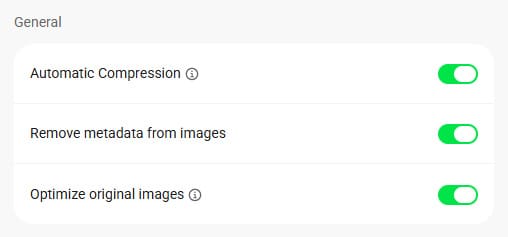
Automatic Compression, in Smush, will optimize and compress images when you upload them to your site.
Next, turn on lazy loading.
Lazy loading tells your site to load images only when a visitor scrolls to them, not all at once. This alone can improve load times noticeably.
Finally, audit your plugins.
Go to Plugins > Installed Plugins and deactivate or delete anything you are not actively using. Every unused plugin adds weight to your site.
Speed Fixes on Squarespace
Squarespace handles a lot of the technical lifting automatically. But there are still things you control.
Avoid adding too many third-party embed codes or custom scripts.
Keep your homepage to fewer sections. A leaner layout loads faster and makes a sharper first impression.
Check Your Speed for Free
Go to Google PageSpeed Insights. Paste your URL and run the report.
A score above 90 is strong. Below 50 is worth addressing soon.
Run it for both desktop, mobile and per page. Mobile results often tell a different story.
It’s worth noting that the score you receive is for that page, not your entire website.
Image Optimization: The Fix Most Med Spas Skip
Why is image size such a big deal? Because that polished before-and-after photo you took on your iPhone is probably 4 to 8 MB.
On a website, that is enormous.
Large, uncompressed images are the leading cause of slow-loading med spa websites. According to website speed statistics updated in 2026 by WP Rocket, 47% of consumers expect a website to load in two seconds or less.
If yours takes longer, they leave — and they don’t come back.
| Image File Size | Total Load Duration |
|---|---|
| 2MB | 0.168 seconds |
| 3MB | 0.252 seconds |
| 4MB | 0.336 seconds |
| 5MB | 0.419 seconds |
| 6MB | 0.503 seconds |
| 7MB | 0.587 seconds |
| 8MB | 0.671 seconds |
| 9MB | 0.755 seconds |
| 10MB | 0.839 seconds |
| 20MB | 1.678 seconds |
An image download chart based on approximate 5G connection speeds.
0.5 seconds might not seem like a lot when it’s one photo. But think of how many images are on the page, and scripts, and files, and chatbot code…
Right-Size Your Images Before You Upload
- Try to keep most web images under 200KB.
- Hero images can go up to 1,200 to 2,000 pixels wide.
- Blog thumbnails work well around 800 pixels wide.
Before uploading, run every image through TinyPNG or Squoosh. Both are free.
Drag in the file, download the compressed version, then upload the compressed image to your site. That’s the whole process.
Use JPG for photos. Use PNG only for graphics that need a transparent background.
Compressing Existing Images on WordPress
If your site already has hundreds of large images, don’t panic.
Install the Smush plugin and scan your existing media library and in bulk.
One click handles what would otherwise take hours.
Compressing Existing Images on Squarespace
Squarespace auto-compresses images to a degree. But uploading smaller files first still makes a meaningful difference.
Run every photo through TinyPNG before uploading.
After uploading in Squarespace, use the built-in focal point tool to keep the subject of your image in frame across different screen sizes.
How to Structure a Blog Post That Actually Converts
Most med spa blog posts are written to exist. They sit on the site, get no traffic, and produce zero bookings. That’s a structure problem, not a writing problem.
A well-structured blog post does double duty.
It ranks on Google and moves the reader toward booking an appointment. This is exactly where medspa marketing and med spa website optimization overlap.
Start With a Hook and a Promise
Your first paragraph should tell the reader what they’ll learn and why it matters to them.
Skip the warm-up sentences. Lead with the point.
Every second a reader spends confused is a second closer to them leaving.
Use Headers to Guide Skimmers
Most readers scan before they commit to reading.
H2 and H3 headers act as a visual table of contents. Make them specific and descriptive.
“How to Reduce Redness After a HydraFacial” beats “The Recovery Experience” every time.
Each section should stand on its own, this matters for AI citation and social content repurposing.
Place CTAs Before the End
Don’t save your call to action for the last sentence.
Add a soft CTA mid-article after you’ve delivered real value.
Something simple like: “Not sure where your site stands? That’s worth a conversation.”
Close each post with a clear, low-pressure invitation to reach out, schedule a call, or learn more about your services.
And don’t forget to link your low-pressure phrase to a contact page, similar to what we just did above.
Internal Linking: The Underused Growth Tool
Internal links are one of the most overlooked parts of website optimization services. They help Google map out your website. They also keep readers engaged longer, which signals relevance to search engines.
What Makes a Good Internal Link
Link to pages that connect naturally to what the reader is already reading.
Use descriptive anchor text.
“Learn more about our laser skin resurfacing” is way more descriptive than “click here”.
Aim for two to four internal links per blog post.
Pages Every Med Spa Should Be Linking To
From every relevant blog post, link to your service pages. Link to your contact or booking page at least once. And link to other blog posts that support the topic.
Writing about summer skincare prep? Link to your laser treatment page.
Writing about Botox aftercare? Link to your Botox service page.
The connections should feel natural, not like a pop quiz.
How to Audit Your Internal Links
On WordPress, use the free Link Whisper plugin. It shows which pages have strong internal links and which are orphaned, meaning no other page on your site links to them.
Orphan pages are nearly invisible to Google.
On Squarespace, do a manual pass through your top 10 most visited pages.
Open each one, read through it, and add links where the connection is natural and useful.
For a deeper look at how an internal linking strategy fits into your broader SEO results, our case studies show what this work looks like over time.
Conclusion
Med spa website optimization is not a developer’s job. It is an owner’s responsibility.
Page speed, image compression, blog structure, and internal linking are all within your reach.
You don’t need code. You need consistency and a starting points.
Pick one area today.
- Run a PageSpeed Insights report.
- Compress the next image before you upload it.
- Add one internal link to your most recent blog post.
Small moves stack up fast.
If DIY feels like too much on top of running a busy practice, that’s exactly what website optimization services are for.
The team at Neur Digital works with med spas to handle this end to end.
Whether you have questions or are ready to book a discovery call, we’re happy to talk through where your site stands and what’s worth fixing first.
Med Spa Website Optimization FAQs
Most technical fixes like page speed and image compression show improvement within days of being implemented.
SEO-related results, like increased search rankings from better blog structure and internal linking, typically take three to six months of consistent effort to become measurable.
The sooner you start, the sooner you compound those gains.
For most of the fixes covered here, no.
Caching plugins, image compression tools, blog formatting, and internal linking are all manageable without any coding knowledge.
A developer becomes necessary when you’re dealing with custom code, server-level configurations, or advanced technical SEO. For most med spa owners on WordPress or Squarespace, the DIY approach gets you very far.
Publishing two to four new blog posts per month is a solid starting point for most med spas.
Beyond new content, audit your existing service pages every six months to make sure pricing, services, and calls to action are current.
Search engines reward websites that show signs of being actively maintained, and so do potential clients doing their research.